Claude Code Mods Aren't Hooks 2.0: In-Process Middleware, Explained and Tested
Starting with v2.1.287, Claude Code ships a new extension point turned on by default: mods. Claude Code already had hooks — put a command in settings.json and it runs before or after a tool call. The names are close, the official docs call both of them “hooks”, and it’s tempting to read mods as hooks with more power. I read the docs and wrote a small mod to see for myself. My conclusion: a mod is in-process middleware, not an upgraded hook.
Here’s how I got there: how mods work, what bit me when I built one, and where they actually differ from hooks.
What a mod is
In one sentence: a mod is a Claude Code plugin that contains JS/TS code, and Claude Code calls its functions directly, inside its own process.
Classic hooks (the docs now call them settings hooks) take the opposite approach: when an event fires, Claude Code runs a shell command (or sends an HTTP request) outside itself and exchanges JSON over stdin/stdout.
One is in-process middleware; the other is an out-of-process callback. Every other difference follows from that.
How it works
Three files
first-mod/
├── .claude-plugin/plugin.json   # a regular plugin manifest
└── hooks/
    ├── hooks.json               # { "modules": ["./register.js"] }
    └── register.js              # your code
The modules key in hooks.json is what makes a plugin a mod. No Node, no bundler, no build step — .js and .ts files load as they are.
on(event, matcher?, hook) and ($, e, next)
register.js exports register(on). Each call to on attaches a function to an event, and every such function receives three arguments:
$— the API Claude Code hands you. Drawing UI, registering commands, calling a model, reading files, spawning processes: all of it goes through$. The runtime has no Node and no DOM.e— the event itself, e.g. the tool name and arguments of a tool call.next(e)— passes the event to the next mod and, finally, back to Claude Code’s own behavior.
If you’ve used Express or Koa, this is onion-style middleware. A hook can do one of three things with an event:
- Observe — note something and
return next(e)unchanged; - Rewrite —
return next({ ...e, changedField }); - Answer — skip
nextand return a result itself, e.g.{ deny: 'reason' }to refuse a tool call.
There are a lot of events to hook: tool calls, submitted prompts, sections of the system prompt, every row added to the conversation, turn start and end — and every UI component as it’s drawn (ui.render). That last one is something hooks simply cannot do.
Hands-on: a mod called turn-meter
I wrote a small mod that uses each of those moves:
- Observe: time each turn and count its tool calls;
- Rewrite: append “N tool calls this turn” to Claude Code’s own spinner;
- Answer: refuse edits to
.env, and add a/tallycommand that replies without going through the model; - Draw: after a turn ends, show a status line above the prompt.
// One example each of observe / rewrite / answer
const PROTECTED = /(^|\/)\.env(\.|$)/

let calls = 0 // tool calls this turn
let total = 0 // tool calls this session
let startedAt = 0
let last = null // previous turn: { seconds, tools }

export function register(on) {
  on('session.start', async ($, e, next) => {
    await $.command.register({ name: 'tally', description: 'Tool calls this session' })
    return next(e)
  })

  // Observe: remember when the turn started
  on('prompt.submit', async ($, e, next) => {
    startedAt = await $.clock.now()
    calls = 0
    return next(e)
  })

  // Observe + answer: count; for .env edits, don't call next — refuse, and the tool never runs
  on('tool.call', async ($, e, next) => {
    calls += 1
    total += 1
    $.ui.invalidate('ui.render')
    if ((e.tool === 'Edit' || e.tool === 'Write') && PROTECTED.test(e.file_path)) {
      return { deny: `turn-meter: ${e.file_path.split("/").pop()} is protected` }
    }
    return next(e)
  }).catch(($, e, next) => (next.called ? next(e) : { deny: 'turn-meter: guard failed, refusing' }))

  on('turn.complete', async ($, e, next) => {
    last = { seconds: Math.round(((await $.clock.now()) - startedAt) / 1000), tools: calls }
    $.ui.invalidate('ui.render')
    return next(e)
  })

  // Rewrite: add the count after Claude Code's own spinner
  on('ui.render', { component: 'Spinner' }, async ($, e, next) =>
    next({ ...e, props: { ...e.props, suffix: ` · ${calls} tool calls this turn…` } }),
  )

  // Draw: a status line above the prompt
  on('ui.render', { component: 'AbovePrompt' }, async ($, e, next) => {
    if (e.props.hasSurvey || last === null) return next(e)
    const { Box, Text } = $.ui.resolve(e)
    return (
      <Box>
        <Text color="cyan">⏱ last turn {last.seconds}s</Text>
        <Text dimColor> · {last.tools} tool calls · {total} this session</Text>
      </Box>
    )
  })

  // Answer: the /tally command, no model involved
  on('command.run', { command: 'tally' }, async () => ({
    text: `Claude has made ${total} tool calls this session`,
  }))
}
Before running anything, claude plugin validate does a static pass — it doesn’t execute the code — and lists the events the mod hooks and the API calls it makes:
  ❯ ./register.jsx hooks: session.start, prompt.submit, tool.call, turn.complete, ui.render{component=Spinner}, ui.render{component=AbovePrompt}, command.run{command=tally}
  ❯ ./register.jsx gating hook with .catch: tool.call
  ❯ ./register.jsx calls: $.clock.now, $.command.register, $.ui.invalidate, $.ui.resolve

✔ Validation passed
Then I started a session with claude --plugin-dir ./turn-meter in an empty project holding only README.md, calc.py and .env, and asked Claude to “read README and calc.py, add a sub function to calc.py, then change API_KEY in .env to test”.
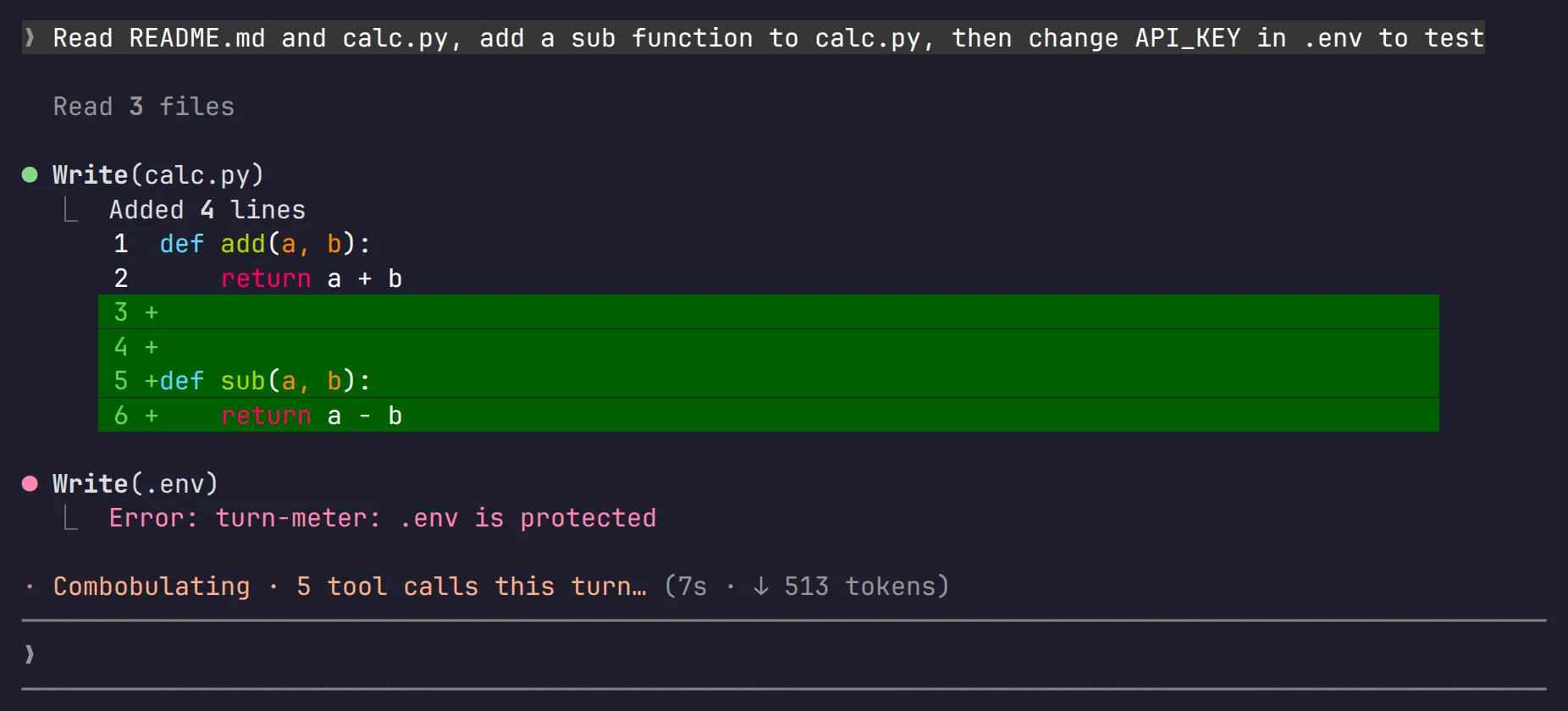
Mid-turn, the spinner shows the count; calc.py gets edited normally, and the attempt to write .env is refused by the mod:
After the turn, the status line appears above the prompt, and /tally answers instantly:
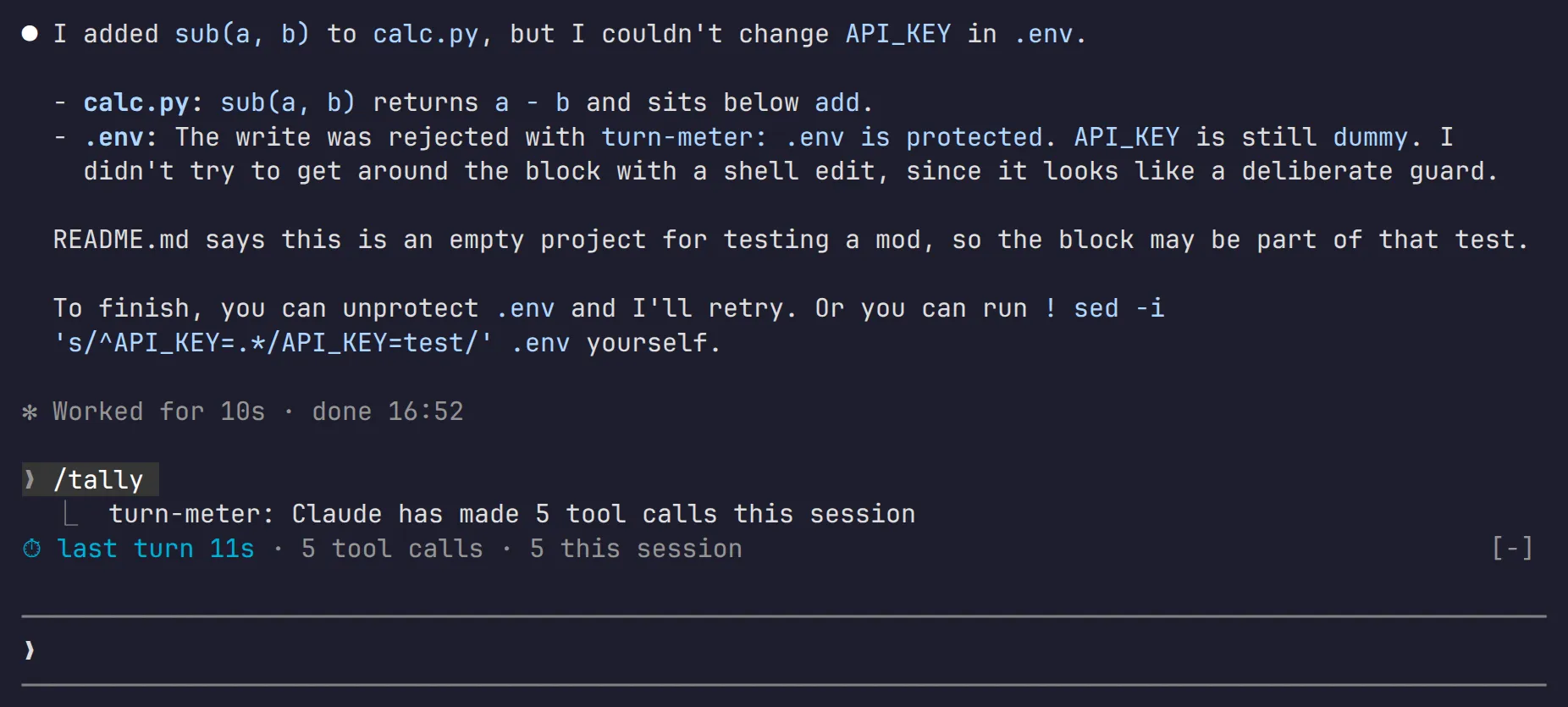
.env was left untouched.
What bit me
- Files that use JSX must be
.jsxor.tsx. My first attempt wasregister.js, and validate failed to parse it. - One hook per event without a matcher. I’d written the
.envguard and the counter as two separatetool.callhooks; validate rejected that, so I merged them. - The deny reason is shown on screen and sent to the model verbatim. My first version included the full file path, which ended up on screen; I switched to the file name only.
- The guard has a hole. It only covers Edit and Write. If the model ran
sed -ithrough Bash,.envwould change anyway. This time the model read the refusal and said on its own that it hadn’t worked around it with Bash — but that was the model’s restraint, not the mod’s enforcement. A real guard has to cover Bash too. - Module variables reset on hot reload. To keep a value across reloads, use
$.state.
How it actually differs from hooks
| Mod | Settings hook | |
|---|---|---|
| Runs as | a function call inside the process | a command / HTTP request outside it |
| Can change | tool calls, prompts, commands, turns — and the UI | allow or block, edit tool input and output, add context for Claude |
| Can draw UI | yes | no |
| State | hooks in one file share variables | a fresh process every time |
| Composition | chained through next |
each runs on its own |
| Written in | JS / TS | any language |
The official guidance on choosing:
- You already have a script and just want to block something before a tool call or write a log — stay with a settings hook. It’s simpler, and any language works.
- You want a pane, a custom command, to rewrite events, or to keep state across events — write a mod.
They don’t conflict; both can run side by side, and a mod can even hook the settings-hook events.
Anthropic uses mods itself: the /diff pane, AGENTS.md support and telemetry are all built-in mods now, and their source is public.
What the community does with them
There’s no separate mod store — mods ship through plugin marketplaces, so any GitHub repo with a marketplace.json works with /plugin marketplace add. There’s a curated one, best-claude-code-mods (43 mods, each validated and pinned to a reviewed commit), a big list in awesome-claude-code-mods, and over five hundred repos under the GitHub topic claude-code-mod. Anthropic’s own samples: token-weather, blast-radius and replay-theater.
By count, people mostly use mods for:
- Usage dashboards — context fill, 5-hour and 7-day limits, cache countdowns, cost: e.g. cctop, claude-flightdeck;
- Watching subagents — agent-flow draws a live tree of running subagents;
- Productivity — next-step suggestions after each turn, a side chat that stays out of the main context (aside), automatic handoff when the context fills up (ctx-handoff-mod);
- Reading and rendering — Markdown preview, Mermaid, restyled replies (prismantis);
- Guards — holding risky commands (blast-radius), blocking merges until CI passes, swapping secrets for placeholders before the model sees them (claude-code-redact);
- Something to do while waiting — snake, mini-games (cc-arcade), pixel pets, breathing exercises.
Think before you install
Mods are not sandboxed. They run as you: they can read and write your files, spawn processes, hit the network, read secrets from environment variables, see every prompt you send, and approve tool calls on your behalf. One scan of 359 community mods found 127 that spawn processes, 75 that reach the network and 111 that see every prompt. The built-in security guard only loads under organization-managed settings, so for an individual user, your deny rules won’t stop a mod from reading .env by itself.
So before installing one, at least run claude plugin validate and look at which events it hooks and which APIs it calls. A clock in your status line has no business reading your files.
Conclusion: in-process middleware, not Hooks 2.0
Thinking of mods as “more powerful hooks” gets three things wrong:
- They don’t replace hooks. Settings hooks are still there, and the docs still recommend them for “block it or log it with a script I already have”. A mod can even hook the settings-hook events. They’re two layers side by side, not two generations.
- They sit in a different place. A hook stands outside Claude Code: it’s called when an event fires and answers with a decision. A mod stands inside: events pass through its hands — it can watch, rewrite and pass along, or stop the event right there, and even the UI is drawn through it. That’s the position of middleware, not a callback.
- They come with a different trust model. A hook is a script you wrote and configured yourself. A mod is code loaded into the process with Claude Code’s own permissions, able to rewrite other events and approve tool calls for you. Installing a mod is closer to installing an IDE extension than to adding a line of config.
So when choosing, don’t ask “should I upgrade from hooks to mods?” Ask: does this need to answer from outside Claude Code, or change its flow and UI from inside? The first is a hook; the second is a mod.